
The Protein Data Bank ("PDB"), maintained at the RCSB at Rutgers University is a powerful resource. This database contains over twelve thousand files describing the three-dimensional structures of proteins and other biological macromolecules, with more than half entered in the past three years; each data file contains the Cartesian coordinates for atoms in the protein, commentary and literature reference, in plain-text. Today you will learn how to search this database and how to visualize the structures using the Swiss PDB Viewer.
Using the PDB Customizeable Search Page with the text search option, type "hemoglobin" or some other protein of interest. Sort structures by resolution in ascending order. You will get a long list of structures. Choose a structure with good resolution (<2A), for example, the structure with the PDB accession code 1BAB or a structure with higher resolution (1IRD). The importance of resolution (and also good "R factors") for a chemically detailed structure is illustrated in this tutorial on resolution in X-ray structures from B. Rupp at Brookhaven National Laboratory. When you hit the EXPLORE button you should see lots of information about this protein including information about the structural neighbors and whether the structure is likely to be of high quality or not, as well as an opportunity to download the coordinates.
Select "download/display" file, and click the link for TEXT, complete
with
coordinates under the PDB file format. This will allow you to actually
see
the PDB file : each atom is listed using specific nomenclature and its
Cartesian
coordinates are given, along with an occupancy factor and a thermal
disorder
factor. Other links inform you about the quality of
the
structure, or contain additional visualization tools, and some describe
the
similarity of this structure to other protein structures.
Today we will look at key examples of proteins from several important
structural
families, mainly at a "coarse grained" level that emphasizes the fold.
Save a local copy of the PDB file 1BAB from the 'Download/Display File' page by clicking the 'X' link under PDB and none (no compression). Click 'save' and save it to the Documents directory found on the desktop.
Swiss PDB Viewer for
Protein Visualization (SPV)
The Swiss
PDB viewer has many powerful features for protein visualization and
analysis. This section outlines the basic features for protein
visualization.
Upon opening the SPV (under Lab applications
on
the desktop), the application may crash. If this happens, decrease the
screen
color depth by click the icon (that looks like a flatpanel monitor) on
the
upper right corner of the desktop and selecting thousands of colors.
Try
re-opening the application at this point.
On the Macintosh version of the Swiss PDB
viewer,
a dialog box will first open when you start the SPV. From the pdb file
you
had downloaded earlier, open the pdb file in the open dialog box
(Desktop
-> Documents).
First, open a PDB file from the Menu Panel:

If the Control Panel is not opened already:

Next you will change the display properties
for
the ribbon.
Under Prefs -> Ribbons..., check the 'Render as Solid
Ribbon'
option and click ok.
Now under Prefs -> 3D rendering, check the 'use
meshes'
option and set the bond radius to 0.4 A.
Now you will show the heme
group
in ball-and-stick format.
In the control panel, scroll to the bottom of
the
list. You will notice a group called HEM (HEM147 for the 1BAB
structure).
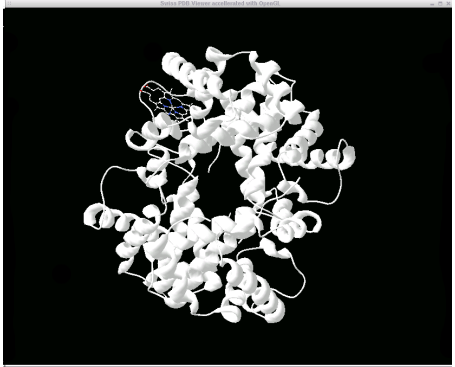
Check the 'show' column for this item and uncheck the ribbn column. You
should
see your protein rendered in ribbon format and the heme group in
ball-and-stick
format.
When you have time, follow this link for
additional featuresof
the Swiss PDB viewer. These additional features will be important later
in
this lab and for future labs.
VISUALIZING HELICAL, SHEET and MIXED PROTEINS
Classes of Proteins
There are many many different types of protein folds, and they are still being discovered at a high rate... Most classification schemes separate protein domains into the broad families: "mostly helical"( or "all helical"), "all sheet" , mixed helical/sheet domains, and cysteine rich and metal containing proteins. The further subdivisons within each category are often based on the shape and the topology of the protein; two popular classification schemes are "SCOP" (Structural Classification of Proteins and CATH (Class / Architecture / Topology / Homologous-Superfamily). Secondary structure elements are common motifs in protein /peptide conformation that can be defined both in terms of backbone torsional states and in terms of hydrogen bonding motifs. These local degrees of freedom give rise to long range regular structures, the secondary structure elements, that form the building blocks of protein architecture, as we will emphasize today. The course on protein structure at Birkbeck College includes a description of the helix, the sheet, and the beta turns which might help you if you are unfamiliar with these secondary structures see especially section on Protein Geometry, links 3-6, the sections on Protein Geometry (and the review of Primary Structure ), Secondary Structure and Tertiary Structure I / Tertiary Structure II .
We will visualize some examples from the broad families: all alpha helix, all beta sheet and mixed alpha beta, roughly following the material in the Branden and Tooze text. We encourage you to compare your detailed view of the protein in the Swiss PDB Viewer, to the following images. These views of the molecule are highly schematic, to serve as a guide for your eye when you have trouble seeing the basic architecture of the molecule. This gallery of structures should also provide an opportunity to review these basic fold types later on.
For each structure,
try to locate the basic fold and compare if possible to the pictures from the class lecture. Being able to see the fold is very hard when you have a
full
atomic detail picture, and is usually much easier if you use cartoon
displays. To make this even easier you can compare the Swiss PDB
Viewer picture with the gallery of structures. For each
structure, we provide a link that takes you directly to the part of
this gallery that pertains. But as far as bringing up a
structure, we would like you to go to the pdb, and use the PDB browser
to search for that structure and even consider other structures that
are available.
Surface Accessible Amino-Acids and labelling by type
The Swiss PDB Viewer has some interesting
coloring schemes. You can color your ribbon by type. As discussed
earlier, color the ribbon by type. The color labels for the
'color by type' scheme are :
Do you notice any interesting localization features in amino-acid type? Now choose and download a membrane protein, look at it using 'color by type' and take a picture. Contrast water soluble proteins to membrane proteins.
If you are unsure which amino acids are
solvent accessible, the Swiss PDB Viewer has a useful feature to label
these amino-acids. Under 'Select -> Accessible aa..', choose a
surface accessible area (30% is a good number). Now the surface
accessible amino-acids are selected. Now by clicking on the label
header under the control panel, only those selected amino-acids will be
labeled.
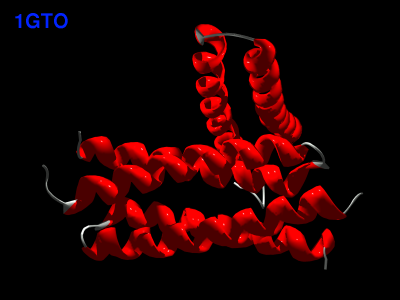
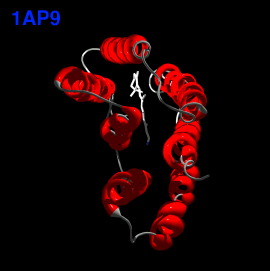
The All-Alpha Helical Proteins
We will look at common all helical folds:
You might wonder how to identify the secondary structure elements in a protein. You can figure out where the helices are in hemoglobin (assuming you are still viewing "1bab" in SPV), using one of the following methods:

The All-Beta Proteins
In the case of the beta-only structures
the following topologies are illustrated in your textbook:
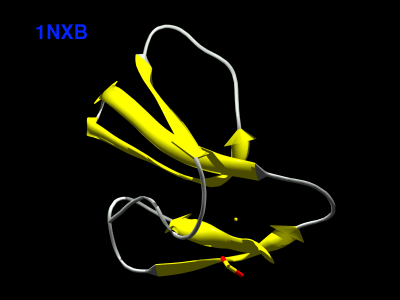
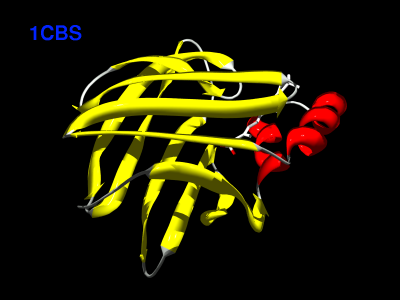
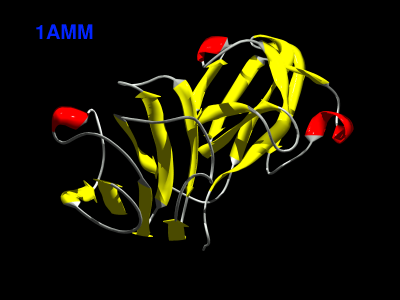
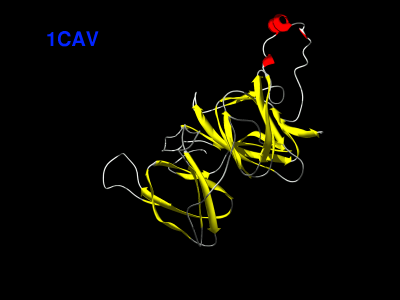


In the previous examples you saw three different types of all beta barrels: one with a sequential topology (up and down barrel) and two with rather complex interleaving topologies resembling the "greek key" or the "jelly roll". With our cartoon version, no loops, you could not distingusih these patterns. Try to visualize these topologies and compare with the cartoons in your text book.
The Immunoglobulin ("IG") domain contains an
interesting example of an interleaved double greek key. Search the PDB
for antibody structures under the text words "antibody" (or synonyms
and related concepts such as IgG (the whole antibody structure) FAB (a
proteolytic fragment of an antibody, as explained in Branden and
Tooze). A search using the textword antibody
produces quite a lot of hits, but to restrict the search you can use
the
qualifiers below in the PDB search page -- select "Resolution" and
enter
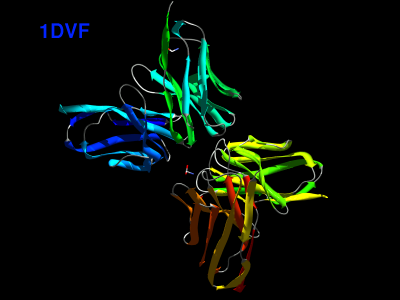
1.0-2.0 (no space). Use the structure 1DVF.View
it in the Swiss PDB viewer with strands colored and cartoon
representation.
1DVF has four IG domains (it is a full FAB
fragment). You might want to view it with each chain colored separately
by coloring
the ribbon using the 'Secondary Structure Succession' coloring scheme.
These proteins are mainly anti-parallel beta sheets. Locate a beta
hairpin and flanking antiparallel beta sections and isolate it in your
view. Now compute and view the hydrogen bonds (see the Swiss PDB viewer
tutorial earlier).
For example, the region 61-77:A involves a beta hairpin. Color them in
context before removing the rest of the molecule from the
display. Note the twist of most of the sheets (62-67 and 70-75).
Restricting the display to just this section, view the segment in
wireframe or sticks with the hydrogen bonds turned on. Identify the
turn; note that the beta hairpin turn makes a very compact reversal of
strand direction. Identify the twist in the sheet structure. Now try to
identify the entire greek key motif in residues 18-75:A.

The beta sheet structure can exhibit another important irregularity called a beta bulge -- this is a "bulged out" residue that changes the hydrogen bond pairing. These secondary structural elements are described in a link "PDB SUM to CATH"--> "BETA BULGES" (the "BETA BULGES" link is right below the "PROMOTIF SUMMARY" link). Expand on the region surrounding one of the bulges, together with the beta strand to which is is hydrogen bonded. Do the same for the gamma turns. Other structural elements listed in the PROMOTIF summary that will be of interest are the beta turns and beta hairpins discussed in the previous paragraph; look at all of these links as well.
Mixed Alpha-Beta Structures
Two very common mixed alpha beta domain motifs are:

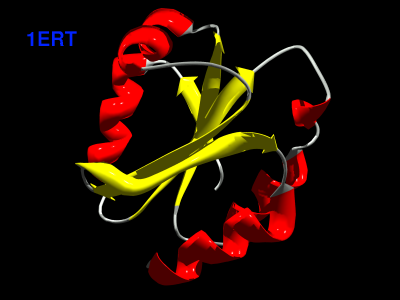
Have a look at an open beta structure with a twisted sheet; for
example thioredoxin. (1ERT) Compare the picture you get
with the
pictures in your reading. Note the twist of the beta sheets. Is it
right handed
or left handed? Are the strands paired in a parallel or an antiparallel
sense?
Look at the SH2 fold (1LKK).
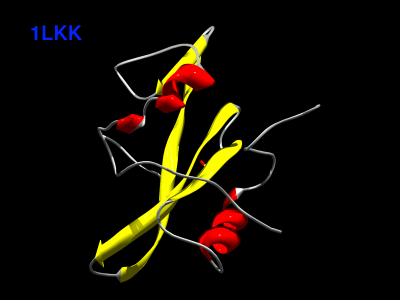
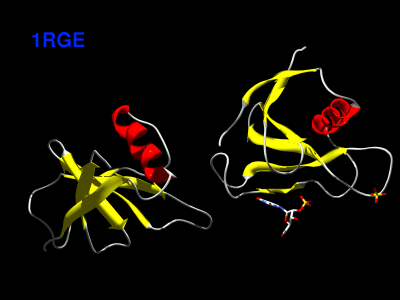
Some mixed ab structures have more separable domains and b domains, and are sometimes called a+b structures. For example, see ribonuclease (1RGE) and a yeast toxin structure (1ONE).

You can visualize most of these proteins using your VRML viewer! Take a quick look at the VRML gallery.
SUMMARY OF OBJECTIVES
We hope that you have gained familiarity with
using protein database, with the architecture of some of the famous
proteins, with secondary structures, and the patterns in surface
exposed vs. buried residues.