DS WEB DESIGN and FUNCTIONS
Results of a mini User Survey 2-3 August 2006
22 people queried; 12 responded
A. Static pages
A.1. The static pages are right-justified, which makes them hard to read for those with learning disabilities (since it throws off regular spacing between letters and words).
ACTION: NO
CHANGE AT PRESENT; ACCESSIBILITY REVIEW
IN SUBSEQUENT PHASE
B. Basic Search
B. 1. The search slot for shelfmarks is too small to hold many call numbers, esp. if they include words like "Additional." [cwd note: e.g. Columbia has mss with call numbers in this format: Smith Western Add. MS 16.]
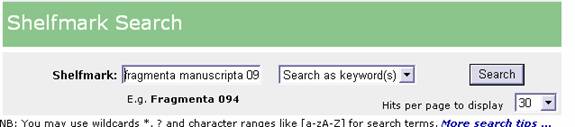
ACTION: INCREASED WIDTH OF FORM BOXES ON BASIC SEARCH PAGE
B.2. The example under shelfmark search, 'fragmenta 094', should perhaps be something more recognizable, like Plimpton or Spencer.
ACTION: EXAMPLE
CHANGED TO FULLER SHELFMARK
B.3. The link to Advanced Search is in too small a font size so it is missed when the reader looks for it, even at a second or third pass. And couldn't it also be placed next to and distinguished from the "New Search" availability? [cwd note: many people commented on this.]
ACTION: INCREASED FONT SIZE & PROMINENCE; ALSO ADDED ADVANCE SEARCH TO NAVIGATION BAR
C. Advanced Search
C.1. The New Search button on the upper right takes you back to the Basic Search page but I always do Advanced Searches, so it might be nice to have the Advanced Search option as a "homing" button. [cwd note: the "Clear Screen" button on the Advanced page is supposed to have that purpose, but since it doesn't have that label, people don't think to use it that way.]
ACTION: ADDED ADVANCE SEARCH TO NAVIGATION BAR
C.2. I use a laptop, so maybe that's the problem (too small a screen?), but it wasn't great to have to scroll down on the Advanced page in order to find the Search button; I kept forgetting it was there and having to look for it all over again each time, and it was just beyond the reach of my screen.
ACTION: ADDED
SEARCH / CLEAR BUTTONS AT TOP
C.3. One can't presently search on literary genres (except in some apparently ad hoc manner); could this be added? [cwd note: the ad hoc genre searches that the reader thought she was hitting were in fact generic titles; the systematic addition of literary genres –with some limits— will be the subject headings that we're trying to add.]
ACTION: NOT
IN PHASE 1 -- CONSIDER FOR LATER PHASE. It
may be possible in an upcoming phase to give
users a Yes / No button for "Representational
Decoration."
D. Browse lists
D.2. It would be nice if, when one selects a MS from the "browse by shelfmarks" list, one could bypass the "search results page", which contains minimal information, and go directly to the full record. This comment comes out of my work with the Smith documents, in which I have to move from document to document many times; this is probably not an issue at all for most users. [cwd note: he has a point, though. Once you've selected a shelfmark in the Browse list, you hardly need to go through the interim results page which only repeats the information of the Browse list.]
ACTION: If only one result, skip brief result screen & display full record.
D.3. ‘Browse by’ option: a box should be added in order to type what one is looking for and find it faster rather than have to scroll down. For instance, if one is looking for a Psalter, one should be able to type the first letters and be brought to the relevant lines in the browsing lists.
ACTION: NOT IN PHASE 1 -- CONSIDER FOR LATER PHASE
D.4. It would be nice to be able to Browse by Title or Author or Language only within certain locations and still be able to order them in ascending date order: that is, to limit the Browse selection that comes up to Columbia Rare Books, or NYPL, and then be able to sort those by date. Right now you can only do one or the other: sort by present location or sort by date.
ACTION: NOT IN PHASE 1 -- CONSIDER FOR LATER PHASE
D.6. The languages searched under Middle English give only
four mss.
ACTION: NONE
[cwd note: we're somewhat hamstrung here, because
of accepting data in an unedited form from participating
institutions; it's bigger than just vocabulary
control: the inputter has to be able
to tell the difference.]
E. Results
E.1. The page with the results of the Advanced Search (and the interim results?) doesn't print out in full, but cuts off on the right.
ACTION: FIXED; need
to let users know to adjust printing margins
in some cases and/or print as "landscape" rather
than "portrait."
E.2. It would be helpful to have a "Next Screen" button at the bottom of the page so you don't have to go back up to the top again after you scroll down for each screen. [cwd note: many people commented on this.] The same is true for the paging ahead as a set of numbers (1 2 3 4 5 , etc); that should be available from the bottom of a page, too.
ACTION: ADDRESS IN LATER PHASE
E.3. It would be useful to be able to go from the thumbnails page of one ms to the next one in the list of results, without having to go back to the results list. [cwd note: I think she is referring to the interim results page; if you choose one record from that page, you can't go to "Next Record" or "Next Entry" or "Next MS" (whatever one might want to call it) directly; you have to return to the interim results, and then choose the next record from that list.]
ACTION: ADDRESS IN LATER PHASE
E.4. It would be helpful if more information were displayed about the results of a search on ranges of dates, rather than just the location and shelfmark. [cwd note: true; we should have a short-and-red display here, too, and we don't: Country, Date of Origin (in red), number of leaves—at least these.]
ACTION:
E.5. When searching for ‘Bathsheba’, for instance, the result lists the manuscripts in which the word occurs, usually in the caption field, but not preceded by the folio number, so that we do not know to which folio the caption corresponds. This makes the user search through all images from one ms to find the one or two relevant to his/her search and this is quite time-consuming.
ACTION: TERRY: Add folio information in front of caption in brief result screen (any time caption is displayed in a query result)
E.6. Why is the shelfmark quoted at the top of the record by itself as if it's a separate piece from the Location? Odd. [cwd note: In fact, we don't need either label, "Location" or "Shelfmark" since they're self-evident.]

ACTION: TEXT REARRANGED
E.7. I thought that the presentation of the results page was too dense and hard to read, as if what matters are the types of information, and not the information itself. [cwd note: I think he's talking about the full results page; and the "types of information" are the labels for the fields.]
ACTION: LABELS MADE LESS PROMINENT; TYPE FONT INCREASED IN IMAGE LINK SECTION
E.8. Searches based on an author or a type of text (e.g. chronicle) respond with that area of interest at the bottom of the description; could the textual information come at the top?
ACTION: NOT IN PHASE 1 -- CONSIDER FOR LATER PHASE
E.9. The Notes to the Text field only shows up on the interim results, and not when you then request the full results. E.g. a search on the word "experimentarius":
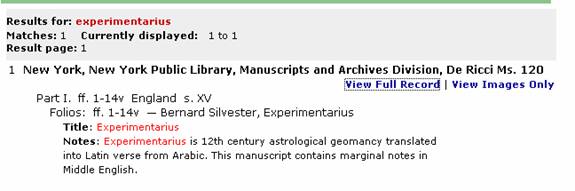
But here is the page for the full record of that same manuscript:
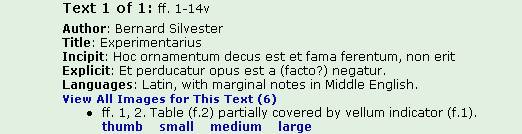
ACTION: [TERRY: Add Notes to the Text in full record display]]
E.10 When you search locations on the new interface, NY Columbia Rare Book etc., the list on screen 3 gives Plimpton 209, 218-235, but not the later numbers. Plimpton picks up again on screens 11-21, although when you first access the page only screens 1-10 are shown as available.
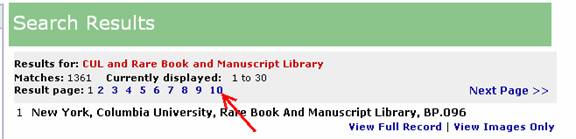
ACTION: [TERRY: Check logic for display of Result page numbers; not working correctly.]
E.11. The captions, when quite long, are chopped off at the far right (because the blue box they lie on is too narrow?).
ACTION: Fixed: see E.1
E.12. A search for all MSS at JTS (via the "current location" pull-down list on the Advanced Search page) yields 2578 hits from all (or nearly all) of the collections in DS. The restriction to JTS also doesn't work when combined with searches in other fields, yielding results from all collections. This error doesn't happen for any other "current location", nor does it happen when one selects JTS from the "browse by locations" list.
ACTION: [TERRY: Please check]
F. Images
F.1. When viewing images from a certain manuscript as thumbnails (see for instance: http://paneer.cc.columbia.edu:8080/ldpd/app/exist/scriptorium/individual/UTA-24.xml?showLightbox=yes ), it would be useful to have access to the full record for the ms from that page. As it is, one has to come back to the list of results to do so and one can easily click on the wrong record. A way to avoid this confusion would also be to change the colour of the links that have been clicked (‘View Full Record’ and ‘View Images Only’), as often happens in websites, so one can track visually which links one has opened so far.
ACTION: [TERRY: On image gallery page, add explicit link (top & bottom) back to full record display]
F.2. I think I would prefer if a different window opened for the image (as it does for the Huntington Library collection) in order to view the information about the manuscript at the same time as the image, rather than juggling back and forth between the previous and next screen. Also, I have lost my page quite a few times thinking I was only closing a window but actually closing the whole thing.
ACTION: [TERRY:
Open separate window for image (only)
display; Phase 2: open HTML window for image
w/ MS information displayed.]
F.3. When viewing an image, it would be useful to have, somewhere, the shelfmark and folio number, as it does not even appear in the filename.
ACTION: See F2 above.
F.4. In the list of images available on the full record, I find that the title of the miniature should be more prominent than the line with links of images in bold (listing ‘thumb small medium and large’). Also the spacing is such that after a couple of titles of miniatures, I can't tell anymore if the 'thumb small medium large' refers to the title about that line or below it.
ACTION: Fixed;
adjusted font size, color and line-spacing.
F.5. For New York Public Library, Spencer Collection, Spencer Collection Ms. 004, in several volumes, problem in the order of display of folios which start with folios from vol. 2, out of sequence; I noticed this sporadically, mainly with NYPL manuscripts.
ACTION: [TERRY: Check whether sequence numbers are being sorted on re order of folios]
F.6. I have tried to save some images into my own folder by right-clicking on the image but often, the files saved are not jpegs and cannot be opened. See for instance numerous Garrett mss in Baltimore, The Johns Hopkins University, The John Work Garrett Library. [cwd note: ? I spot-checked and found only jpgs; I only tried to download a couple of them, however.]
ACTION: CANNOT REPRODUCE; DEPENDENT ON IMAGE SOURCE / INSTITUTION AND USER'S BROWSER / WORKSTATION
G. Huntington
G.1. In the Huntington Library section, no way of going from one particular image to the manuscript full record: quite awkward to use.
ACTION: Phase
2
G.2. Also in Huntington's section, there's no method for returning to DS itself, short of repeating tapping on the Back arrow. You'd hardly even know that you're in DS itself, in fact.
ACTION: Phase
2
H. Upshot of it all
H. 1. Congratulations on the new search interface. It is infinitely friendlier than the last, and the similarity to the WorldCat, etc. searching screens means, I think, that all users will find they have a firmer footing at the very start. I did my exploration on a computer in the Bodleian Lower Reading Room, and -- despite the sun streaming through the window -- everything seemed clearly legible. I found everything, in fact, elegant in its presentation. There was nothing that my heart desired that seemed to be unattainable.
Here follows a little laundry list of bloopers I ran into, some of which, of course, may be already known to you: [cwd note: yes, they pertained to image problems and to error messages to the DS static pages. P.S. this user is an American who happened to be in Oxford when my request for evaluation came through on email.]
H. 2. Still think the website is the best thing since sliced bread and wish you had more libraries on it. Very cool though.
H.3. I didn't like how in the old interface you had to page through the whole shelfmark list one page at a time, with no option to go to, say, page 10; the new interface 'browse by shelfmarks' lists them all on one scroll, which is better.