MULTI-PAGE DOCUMENTS
The Insight Administration Tools provide the ability to define how multiple page-images will be compiled into an Insight Multi-page document. In a first step the administrator defines:
- The data field that will identify separate documents. All page images for each document must have the same value in this field. Optionally, a field can be defined for the document title, which may more intelligible than the identifier field. For example the document identifier field might be the ISBN number with a field value of 0-679-76489-5, while the title might be “Mr. Wilson’s Cabinet of Wonder”.
- Fields that define the ordering sequence for how documents are organized. At the top level is the identifying field that distinguishes one document from another. To sort pages in a prescribed order there must be at least a second level that can be used to order page-images. There also may be intervening levels that specify document sections as well as order. A typical example of levels would be fields for a book, chapters, and pages. The Insight user control for Multi-page Documents provides a section advance button (>>) as well as a page advance button (>).
Once the administrator has confirmed the fields for compiling documents, Insight will process the collection data and create a table of the documents it encounters. A filter for minimum document pages is available.
In a second step, the administrator has the ability to determine which of the potential documents listed should be compiled and indexed into the collection. Available as part of the Indexer, the administrator can see the list of documents Insight has found and select all or ranges of documents for indexing.
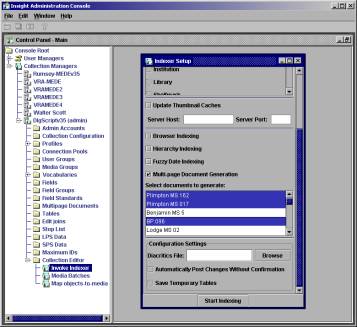
Once documents have been selected, starting the indexer will generate the multi-page documents in Insight.
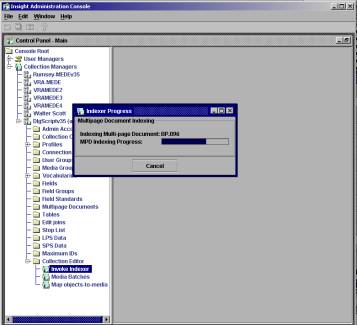
During the indexing process, the Multi-page Document is compiled by first querying for all the values that match the defined identity value. Once all the records associated with the document are gathered, the level fields establish a hierarchy and sequence order within each document.
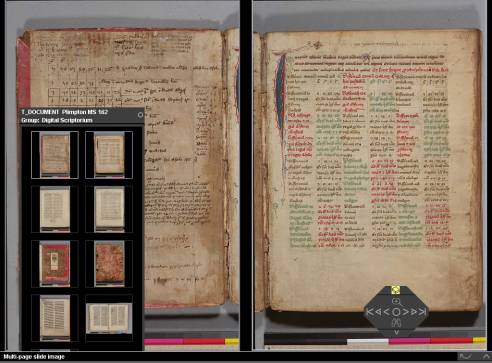
A third step for performing document-specific page layout is available from within the Insight client for those users with administrative privileges. The default display for Multi-page Documents is a single page-image. As desired, the user can change display to a double page spread by linking a first image to a second image in the thumbnail window for a document. Insight will automatically size the two page images to fit on the screen together. Three-page layouts can also be created, although page size diminishes as pages on the screen increase. Once saved, these layout characteristics become part of the Multi-page Document. Pages appear simultaneously when page turning arrives at the first image or when either page is selected for display.