 Webstats 3.0 Work Flow Diagrams
At Columbia we have three machines (each is a dual processor Sparc) that function as our primary web server, answering requests for www.columbia.edu. Weekly reports are generated by webstats for the primary web server and for the secure servers. Our primary web server also provides virtual host service for several non-profit groups, and we create separate reports for each virtual host. Those virtual host log records are included in the logs for our primary web server, but they are identified with a "vhost" marker. More information about our extensions to the standard log format can be found in our Access Log Format Description.
On each web server host, every day, the access log files are rotated and compressed and copied to a directory on the shared filesystem. The logs are removed from the individual hosts after they have been copied successfully. The log files are organized by host name, and each log file directory (in our examples, jonapot and kwaziwai) contains a curr subdirectory (actually, it's a symlink to a weekly subdirectory, but more on that later) which contains the daily log files for the current week. The IP addresses in each daily log file must be resolved into host names (fully qualified domain names) and the daily files must be concatenated into weekly files. The daily files are kept for another week, and then removed.
The error logs are rotated, compressed, copied, and concatenated, but they are not processed by logres or webstats. We keep them for archival purposes only.
logres runs daily to resolve IP addresses into fully qualified domain names, and to clean up the log records. It caches IP addresses that have been looked up, so it doesn't have to look them up again. The cache is read from disk on startup, and written back to disk on completion. This file (iptable.bin) grows every time logres is executed. When it contains 750,000 entries the file is automatically erased by logres. It takes about 6 weeks for the iptable.bin file to reach this size, so the file is erased about every six weeks, and the entries are never more than six weeks old (DNS entries can get stale after a while).
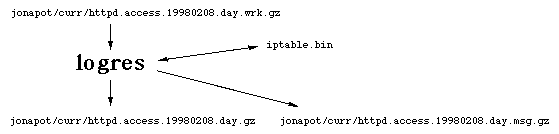
The naming convention used in our examples specifies that the input files read by logres have names ending in "day.wrk.gz" while the output files (containing fully qualified domain names and cleaned up records) will use names ending in "day.gz". The input file is automatically removed when logres is invoked using the -k option. The message file contains all the parse errors found by logres while processing the input. Corrected records are written to the output file, so you should not be concerned about these error messages. The input file and output file are specified in the logres command line (or command file). The message file name is constructed automatically by adding ".msg" to the end of the output file name. Since the output file name ends with "day.gz", the message file name ends with "day.msg.gz".
In addition to resolving IP addresses, logres performs additional functions, cleaning up the input records and discarding junk records. webstats will use these cleaned up log files to produce its reports, and to produce the extract files.
If your web server is configured to resolve IP addresses into host names (HostnameLookups on) then you don't really need to use logres. But we recommend that you use it anyway, to fix unmatched quotes, truncate really long fields, discard junk records, etc.
At the end of each week, when all seven daily files have been processed by logres, zcat is used to uncompress and concatenate the daily log files into a weekly file.
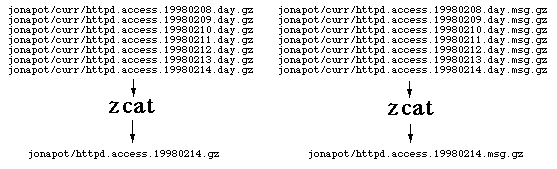
The above diagrams show the daily processing (logres) and the weekly processing (zcat) for the log records on a single host (jonapot, in our example). Since we have two hosts answering requests for our web server, these steps must be duplicated for the log files on our other web server host, kwaziwai. If all that goes off without a hitch, we should have a weekly log file for jonapot, and one for kwaziwai.
We run webstats to process both weekly log files and write a variety of reports in HTML format.
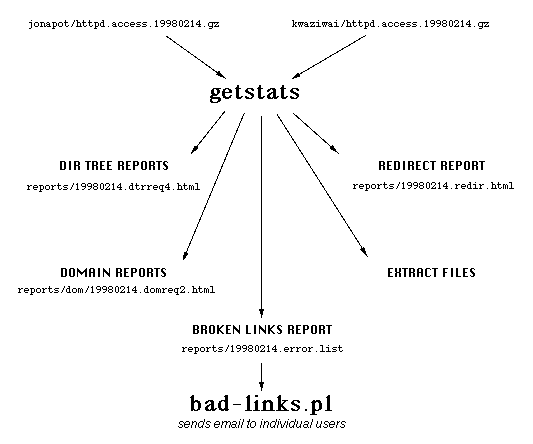
The reports are accessed using the showstats CGI script, which expects the reports to use this file naming convention: yyyymmdd.tttsssd.html
The Redirect Report file names use a slightly simpler naming convention, as shown in the examples. If you want to use a different file naming scheme, be sure to change the showstats script accordingly.
The bad-links.pl script is used to send a weekly error report to web managers by email. Failed requests are screened by webstats, and if the referer was a page on our server we send mail to the owner of that page informing them of the errors.
 Academic Information Systems
212 854.1919
[email protected]
Academic Information Systems
212 854.1919
[email protected]