Rasmol for Mac
Download the file: RasMac26.sit.hqxThe folder Rasmol v2.6 should extract itself automatically into your download folder. You can then trash the files RasMac26.sit.hqx and RasMac26.sit. If this does not work, you will need to unpack the file RasMac26.sit.hqx, by using the application StuffIt Expander and select the option Expand from the File menu. This should create the folder RasMol v2.6.
Configuring Netscape Navigator 3 or 4.
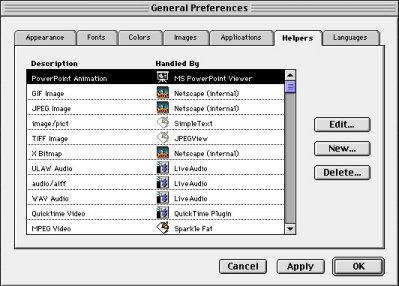 Netscape 3: Under the Options menu, select General Preferences. Click on the Helpers tab.
Select New....
Netscape 3: Under the Options menu, select General Preferences. Click on the Helpers tab.
Select New....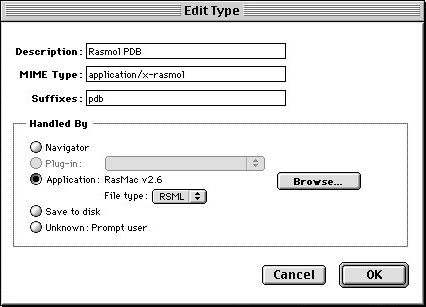 For Description, type Rasmol PDB. For MIME Type, type application/x-rasmol. For Suffixes, type pdb.
Under Handled By, select the Application button and click on Browse.... Find the rasmol executable file, RasMac v2.6. Press Open. You should see the rasmol application next to the Application field. For File type,
select RSML. Press OK.
For Description, type Rasmol PDB. For MIME Type, type application/x-rasmol. For Suffixes, type pdb.
Under Handled By, select the Application button and click on Browse.... Find the rasmol executable file, RasMac v2.6. Press Open. You should see the rasmol application next to the Application field. For File type,
select RSML. Press OK.
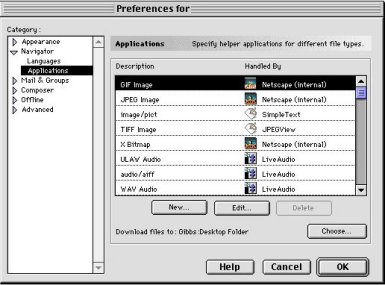 Netscape 4: Under the Edit menu, select Preferences. In the Prefences window, under Navigator, select Applications. Select New....
 For Description, type Rasmol PDB. For MIME Type, type application/x-rasmol. For Suffixes, type pdb.
Under Handled by, select the Application button and click on Choose.... Find the rasmol executable file, RasMac v2.6. Press Open. You should see the rasmol application next to the Application field. For File type,
select RSML. Press OK.
Rasmol for PC
For Windows 3.1: Visit the Rasmol download site for Windows 3.1 download instructions.For Windows 95 or NT: Download the file raswin32.exe. It is a self-extracting file. Double-click to extract the 3 files, rasmol.exe, rasmol.hlp, and raswin.hlp. The files will automatically extract into a folder called Rasmol.
Configuring Netscape Navigator 3 or 4.
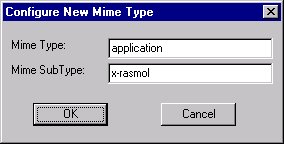
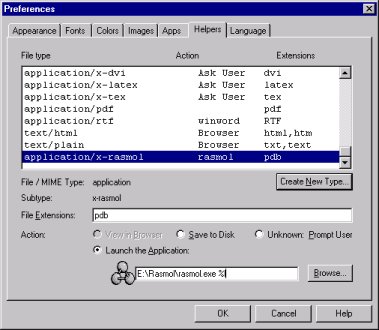 Netscape 3: Under the Options menu, select General Preferences. Click on the Helpers tab. Press Create New Type.... Under Mime Type, type application. Under Mime SubType, type x-rasmol. On the
chart, find application/x-rasmol under the File Type heading. Click on it. Below the chart, the File / MIME Type should read application and SubType should be x-rasmol. On the File Extensions field, type <
B>pdb. Click on the Launch the Application button, and press Browse.... Find the rasmol executable (.exe) file. Press Open. You should see the rasmol application under the Launch the Application field. Edit the field and r
emove any quotation marks at the beginning and
end of the field. Add the following to the line: %l. For example, if the field says
Netscape 3: Under the Options menu, select General Preferences. Click on the Helpers tab. Press Create New Type.... Under Mime Type, type application. Under Mime SubType, type x-rasmol. On the
chart, find application/x-rasmol under the File Type heading. Click on it. Below the chart, the File / MIME Type should read application and SubType should be x-rasmol. On the File Extensions field, type <
B>pdb. Click on the Launch the Application button, and press Browse.... Find the rasmol executable (.exe) file. Press Open. You should see the rasmol application under the Launch the Application field. Edit the field and r
emove any quotation marks at the beginning and
end of the field. Add the following to the line: %l. For example, if the field says
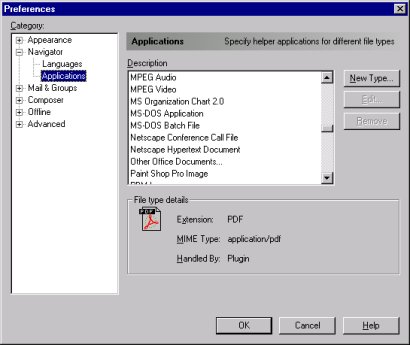 Netscape 4: Under the Edit menu, select Preferences. In the Prefences window, under Navigator, select Applications. Select New Type....
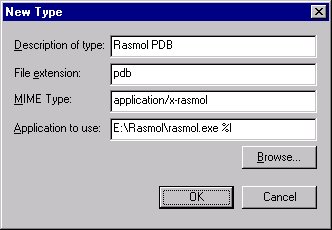 For Description of type, type Rasmol PDB. For File extension, type pdb. For MIME Type, type application/x-rasmol.
Click on Browse and find the rasmol executable (.exe) file. Press Open. You should see the rasmol application in the Application to use field. Edit the field and remove any quotation marks at the beginning and
end of the field. Add the following to the line: %l. For example, if the field says
For Description of type, type Rasmol PDB. For File extension, type pdb. For MIME Type, type application/x-rasmol.
Click on Browse and find the rasmol executable (.exe) file. Press Open. You should see the rasmol application in the Application to use field. Edit the field and remove any quotation marks at the beginning and
end of the field. Add the following to the line: %l. For example, if the field says
Rasmol for SGI
Method 1: Open a unix shell and type ls -al | more. You should see a listing of the files in your directory. If you do not see the files .mailcap and .mime.types, then type in the two commands:cp /usr/local/chemistry/ChemGate_Spring98/RasMol/.mailcap .mailcap
cp /usr/local/chemistry/ChemGate_Spring98/RasMol/.mime.types .mime.types
If it asks to overwrite files, type y or yes, unless you have previously configured Netscape for your own personal applications.
Rasmol should now work. If you have those two files or desire manual configuration, follow method 2.
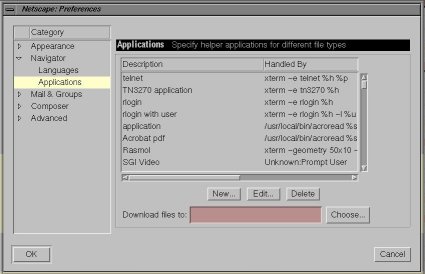 Method 2: In Netscape,
under the Edit menu, select Preferences. In the Prefences window, under Navigator, select Applications. Select New....
Method 2: In Netscape,
under the Edit menu, select Preferences. In the Prefences window, under Navigator, select Applications. Select New....
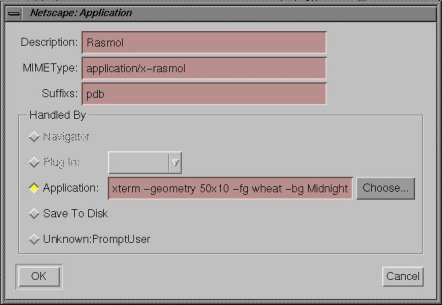 For Description, type Rasmol. For MIME Type, type application/x-rasmol. For Suffixes, type pdb.
Under Handled by, select the Application button. In the field to the right, type in xterm -geometry 50x10 -fg wheat -bg MidnightBlue -cr IndianRed -sb -fn rom10 -e /usr/local/bin/rasmol %s >/dev/null 2>&1. Press OK.
For Description, type Rasmol. For MIME Type, type application/x-rasmol. For Suffixes, type pdb.
Under Handled by, select the Application button. In the field to the right, type in xterm -geometry 50x10 -fg wheat -bg MidnightBlue -cr IndianRed -sb -fn rom10 -e /usr/local/bin/rasmol %s >/dev/null 2>&1. Press OK.