
|
Facilities > Electronic Classroom Tutorials Touch Panel Tutorial Below are images of the Lavalier microphone used in the classrooms/conference rooms. To power the microphone on or off you would press the red highlighted buttons on the sides of the microphone; the front cover will release, and then press the "ON/OFF" button. Please note: the microphone is already powered on in these images. Press the highlighted red buttons on the sides of the microphone.  While pressing the buttons lift the front cover. Then press the highlighted "on/ off" button to power it on.  Make sure the microphone is not set to mute.  Clip the Lapel Mic on to your lapel. 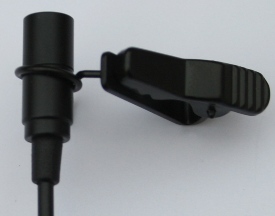 Go Back |
 |
|
|
CU Home | |
A-Z Index | Help | |
|
|
 |
|
|
|
|
|
|
||||||
|
|
|
|||
|
|||||
|
|
 |
|||
|
|
|
|||
|
|
|
|||