
Client side image map enable you to use various portions of an image as distinct links.
The maps work only over the HTTP protocol; an alternative link needs to be made to enable files to be accessed via alternate protocols.
Defining an image map involves two steps:
1.Defining the image source as a map:
<IMG BORDER=0 SRC="./gallery/scales.gif" USEMAP="Insert Current File Name.html#go.map">
If the USEMAP tag begins with a "#", it is assumed to be in the same document as the IMG
tag.
2.Defining the map's coordinates.
This portion of the code can be inserted at the bottom of the document.
Determining the coordinates can be done by using applications such as Photoshop or Webmap.
This is the general code for defining two rectangular areas as links in an image:

A NOHREF tag indicates that clicks in this region will perform no action.
An HREF tag specifies the current area's link.
The 4 numbers constituting the rectangle's coordinates describe, in this order, its left, top, right, and bottom.
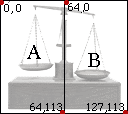

Image maps can also use shapes other than rectangles ("RECT" tag).
Circles ("CIRCLE" tag) are defined through a center point (x, y) and a radius (z) - a total of three numbers.
Polygons ("POLY" tag) are described through sets of two numbers (x, y), each defining a point in the shape.
Any number of areas may be specified. If two areas overlap, the
one that appears first in the map definition takes precedence.

Server side image maps rely on the internet server provider to provide URL links in relation to specified areas within an image.
The Browser sends the set of coordinates to the server which in turn interprets those coordinates via a CGI script, and then
returns the proper URL for that area to the browser. A CGI script is a set of instructions written in unix code. The script
always lives within a folder named
"cgi-bin" on the server.
Unlike Client side image maps, Server side maps can be read by all protocols. However, they are slower, requiring two
steps in the process of interpreting each click (browser-server; server-browser). Furthermore, unlike for normal links,
there is no way for a browser to provide visual feedback to the user by showing where a portion of an image map
leads before the user actually clicks on it.
To get the best of both options - Clients side image map code and Server side map code can be combined.
Defining a server side image map involves two steps:
1.Defining the image source as a map:
<A HREF="Image_map_coordinates_description.html"><IMG BORDER=0 SRC="./gallery/scales.gif" ISMAP></A>
2. A separate html document ("Image_map_coordinates_description.html") is referred to from within the IMG map.
This file containes the coordinate information supplied by applications such as Webmap.



